Why We Use QUIC.cloud CDN to Improve WordPress Website Performance

Website performance is about much more than how quickly a homepage appears on your own computer.
A modern WordPress website may need to serve visitors across different cities, states and countries, while processing images, CSS, JavaScript, database queries, plugins, eCommerce functionality and dynamic content. The further a visitor is located from the server hosting the website, the more noticeable those delays can become.
This is where a Content Delivery Network, or CDN, can make a significant difference.
At TecnoMarketing, website performance is an important part of how we approach WordPress website design and hosting. One of the technologies that can be incorporated into our WordPress hosting environment is QUIC.cloud, a CDN and optimisation platform specifically designed around WordPress and its integration with LiteSpeed Cache.
In this article, we’ll explain what QUIC.cloud is, how its CDN works, why it can be particularly effective for WordPress websites, and how it forms part of a broader approach to building faster and more reliable websites.
What Is a Content Delivery Network?
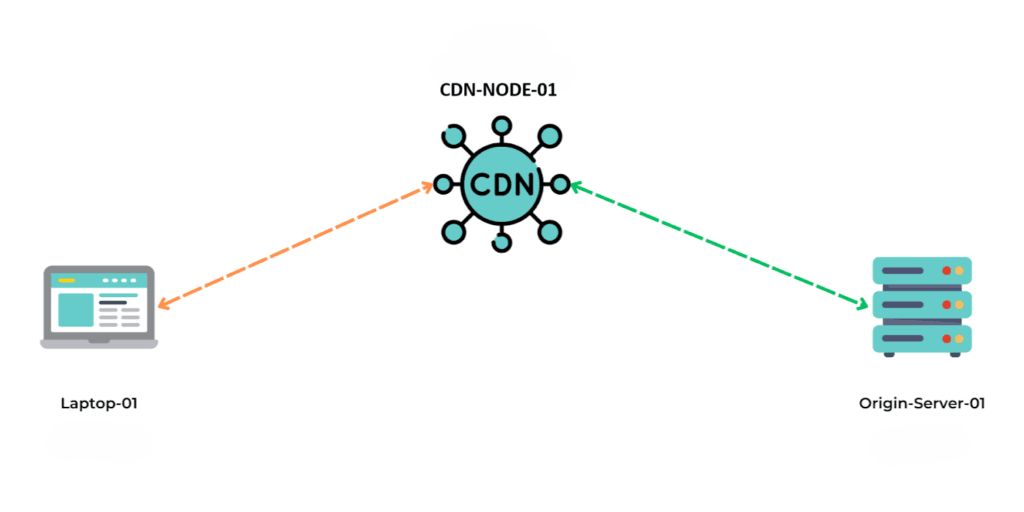
Before looking specifically at QUIC.cloud, it helps to understand what a CDN actually does.
When somebody visits a website without a CDN, their browser generally needs to communicate with the server where that website is hosted.
If the website is hosted in Australia and the visitor is also located in Australia, the physical distance may be relatively small.
However, if the visitor is located overseas, those requests may need to travel thousands of kilometres before reaching the hosting server and returning the requested content.
Every trip adds latency.
A Content Delivery Network places servers, commonly known as Points of Presence or PoPs, in different geographic locations.
Instead of every visitor retrieving website content directly from the original hosting server, cached content can be delivered from a CDN location closer to them.
The result can be significantly faster delivery, particularly for visitors located further away from the website’s origin server.
But QUIC.cloud takes this concept further for WordPress.
What Makes QUIC.cloud Different?
Many traditional CDNs are particularly effective at caching static website files.
These include things such as:
- Images
- CSS stylesheets
- JavaScript files
- Fonts
- Videos and other media
WordPress, however, isn’t simply a collection of static files.
It is a dynamic Content Management System.
When a visitor requests a WordPress page that isn’t already cached, the hosting server may need to execute PHP, communicate with the WordPress database, process plugins and themes, assemble the page and finally return the generated HTML to the visitor.
That requires considerably more processing than simply delivering an image.
QUIC.cloud is specifically designed for WordPress and integrates with the LiteSpeed Cache for WordPress plugin.
One of its major advantages is its ability to cache both static and dynamically generated WordPress content at the CDN level.
QUIC.cloud describes its CDN as a reverse-proxy CDN designed specifically for WordPress. Through its LiteSpeed Cache integration, cached versions of dynamically generated pages can be served from the CDN rather than requiring every eligible request to return to the origin server.
This is one of the reasons we find the combination of WordPress, LiteSpeed Cache and QUIC.cloud particularly compelling.
The Benefits of QUIC.cloud for WordPress Hosting
1. Dynamic WordPress Page Caching
This is arguably one of QUIC.cloud’s most important advantages.
Consider a normal WordPress page.
Without caching, WordPress may need to perform a series of operations every time somebody requests that page:
Visitor → Web Server → PHP → WordPress → Plugins → Database → Generated Page → Visitor
There can potentially be dozens or hundreds of database queries involved in producing a single page.
Caching changes this considerably.
Once WordPress has generated a page, LiteSpeed Cache can create a cached version of that content. QUIC.cloud can then make eligible cached content available through its CDN infrastructure.
A subsequent visitor may therefore receive a cached version of the page rather than requiring the origin server to completely regenerate it.
The process becomes much closer to:
Visitor → QUIC.cloud CDN → Cached Page → Visitor
That can dramatically reduce the amount of work being performed by the hosting server.
It also means that the advantages of a CDN aren’t limited to images and other static assets.
2. Reduced Load on the Hosting Server
Website performance isn’t only about network speed.
Server resources matter too.
WordPress relies heavily on CPU processing, PHP workers, memory and database performance. This becomes particularly important when a website experiences multiple simultaneous visitors.
If every visitor requires WordPress to dynamically generate every page, server resources can quickly increase.
Serving cached requests through QUIC.cloud means fewer requests need to reach the origin server.
This can reduce:
- PHP processing
- Database queries
- CPU utilisation
- Server bandwidth
- Concurrent requests reaching the server
For a business website, this provides another important benefit: scalability.
A well-configured caching and CDN strategy can allow the hosting infrastructure to handle substantially more traffic than an equivalent configuration where every request must be dynamically generated.
3. Faster Website Delivery Across Different Locations
The physical location of your web server still matters.
Even extremely powerful hardware can’t completely eliminate network latency.
QUIC.cloud operates a distributed global CDN network. When content is available from the CDN, visitors can potentially receive it from a network location closer to them rather than travelling all the way back to the original hosting server.
For Australian businesses, this can be particularly valuable when websites attract visitors from multiple regions or international markets.
A business might primarily service customers in Queensland, for example, while still receiving traffic from Sydney, Melbourne, New Zealand, the United States, Europe or Asia.
A CDN helps reduce the importance of the physical distance between those visitors and the origin hosting server.
4. Improved Time to First Byte
One website performance metric we pay particular attention to is Time to First Byte, commonly referred to as TTFB.
TTFB measures how long it takes before a visitor’s browser begins receiving a response from the server.
Slow TTFB can be caused by several factors, including:
- Server location
- Network latency
- PHP processing
- Database performance
- WordPress plugins
- Server load
- Lack of page caching
When an eligible page is already cached at a nearby CDN location, much of this processing can potentially be bypassed.
Instead of waiting for WordPress and PHP to construct the page from scratch, the CDN can return the cached response.
This is particularly useful for public-facing pages such as:
HomepagesService pagesBlog articlesLanding pagesProduct categoriesPublic WooCommerce product pages
Not every page should be cached — account dashboards, shopping carts and checkout pages are obvious examples — but intelligent WordPress caching allows different types of content to be handled appropriately.
5. Smart Cache Purging
Caching a WordPress website isn’t simply about storing pages.
The cache also needs to know when content has changed.
Imagine updating the price of a product or changing the information on a service page.
A poorly configured caching system could continue showing visitors the old version until the cache expires.
The integration between LiteSpeed Cache and QUIC.cloud helps address this through LiteSpeed’s cache management and purge functionality.
When relevant WordPress content changes, cached versions can be invalidated so that visitors aren’t unnecessarily served outdated content.
This close relationship between the WordPress caching plugin and CDN is one of the major advantages of using an ecosystem specifically designed around WordPress caching.
QUIC.cloud Goes Beyond a Traditional CDN
While the CDN component is particularly useful, QUIC.cloud also provides several WordPress optimisation services.
These can work alongside LiteSpeed Cache to further optimise the amount of information a visitor needs to download.
QUIC.cloud currently provides services including Image Optimisation, Critical CSS, Unique CSS, Viewport Images and Low-Quality Image Placeholders.
Image Optimisation
Images are frequently among the largest elements on a website.
A high-resolution photograph uploaded directly from a camera or smartphone could potentially be several megabytes.
Multiply that across a page containing several images and the amount of data visitors need to download can increase rapidly.
QUIC.cloud’s image optimisation service can help reduce image file sizes and generate modern formats including WebP and AVIF.
Smaller images generally mean:
- Faster page loads
- Reduced bandwidth
- Better mobile performance
- Improved user experience
This is especially important for eCommerce websites, portfolios and businesses using large amounts of visual content.
Critical CSS
Most modern websites contain CSS files responsible for styling everything from headings and buttons to menus, forms and mobile layouts.
The problem is that a visitor doesn’t necessarily need all of that CSS immediately.
Critical CSS identifies styling required for the initially visible portion of a page so that important content can be rendered sooner.
The remaining styling can then be processed afterwards.
This can improve the perception of website speed because visitors see meaningful, correctly styled content sooner.
Unique CSS
WordPress themes and plugins can generate substantial CSS files.
However, an individual page may only use a fraction of those CSS rules.
Unique CSS aims to remove unnecessary CSS for a particular page, reducing the amount of information the browser needs to process.
For feature-rich WordPress websites, reducing unnecessary CSS can make a noticeable difference.
Viewport Images and Lazy Loading
Lazy loading delays images until they’re actually required.
This is extremely useful further down a page, but images visible immediately when the page loads shouldn’t necessarily be delayed.
Viewport Images can help identify images within the initial viewport so that important above-the-fold imagery isn’t unnecessarily lazy loaded.
When properly configured, this can contribute towards better perceived loading performance and improvements to metrics such as Largest Contentful Paint.
QUIC.cloud and WooCommerce
CDN and caching configuration becomes particularly important with WooCommerce.
Unlike a basic business website, an eCommerce website combines highly cacheable content with highly dynamic and personalised information.
For example, a WooCommerce product page can generally benefit heavily from caching.
A customer’s checkout cannot.
The same applies to areas such as:
- Shopping carts
- My Account
- Order information
- Customer sessions
- Personalised content
This is where using a caching platform built specifically around WordPress becomes extremely valuable.
LiteSpeed Cache understands WordPress and WooCommerce behaviour, while QUIC.cloud extends that caching capability to the CDN.
When configured correctly, public content can receive aggressive performance optimisation while sensitive and customer-specific areas continue to operate dynamically.
Performance Is Also About Handling Traffic Spikes
There’s another CDN benefit that isn’t always immediately obvious.
Imagine a website normally receives 100 visitors per day.
Then a marketing campaign launches.
A Facebook post performs particularly well, a Google Ads campaign starts generating traffic, an email campaign is sent, or a piece of content unexpectedly receives thousands of visitors.
Suddenly the server may be dealing with considerably more simultaneous traffic.
Without caching, each visitor could potentially generate PHP processes and database queries.
With an effective CDN and caching configuration, a significant percentage of public page requests may be handled without reaching the origin server at all.
That provides an additional layer of resilience.
It doesn’t make server resources irrelevant, but it allows those resources to be used more efficiently.
Website Performance Can Affect More Than Page Speed Scores
It’s easy to become overly focused on achieving a perfect score in performance testing tools.
But website optimisation isn’t really about achieving “100/100”.
It’s about the experience of the person actually using the website.
A faster website can mean visitors:
- Reach information sooner
- Navigate between pages more quickly
- Experience fewer frustrating delays
- Browse more products
- Complete forms more easily
- Have a better experience on mobile connections
Performance can also contribute to important Google Core Web Vitals metrics.
Google has repeatedly emphasised page experience and Core Web Vitals as part of its broader approach to evaluating website experience.
That means website performance should be considered during the design and hosting process rather than being treated as something to fix afterwards.
How Do You Set Up QUIC.cloud on WordPress?
Despite the technology happening behind the scenes, connecting a WordPress website to QUIC.cloud is relatively straightforward.
The exact configuration will vary depending on the website, hosting environment and DNS provider, but the general process looks like this:
1. Install LiteSpeed Cache for WordPress
The LiteSpeed Cache plugin is installed and activated within WordPress.
QUIC.cloud’s WordPress integration requires LiteSpeed Cache for WordPress.
2. Connect WordPress to QUIC.cloud
Within WordPress, navigate to:
LiteSpeed Cache → General → Online Services
From here, QUIC.cloud services can be enabled and the WordPress installation paired with QUIC.cloud.
3. Create or Connect a QUIC.cloud Account
The website can then be associated with a QUIC.cloud account, providing access to CDN configuration, usage and additional services.
4. Enable the CDN
The CDN service can then be enabled for the domain.
5. Configure DNS
For QUIC.cloud to operate as the CDN, DNS needs to direct website traffic through its network.
QUIC.cloud supports using its own DNS service or, depending on the DNS configuration, using CNAME-based configuration.
Existing Cloudflare users also have a dedicated QUIC.cloud integration process that can simplify connecting the CDN.
6. Verify the CDN
Once DNS changes have propagated, the CDN status should be checked to confirm that requests are being correctly routed and cached.
7. Configure LiteSpeed Cache
Finally, LiteSpeed Cache should be configured appropriately for the website.
This can include:
Page cachingBrowser cachingCSS optimisationJavaScript optimisationLazy loadingImage optimisationWebP/AVIF deliveryDatabase optimisationCache exclusionsWooCommerce configuration
This stage is particularly important.
Simply installing a caching plugin doesn’t automatically mean a website is properly optimised. Overly aggressive optimisation can actually cause visual or functional problems, while insufficient optimisation can leave considerable performance improvements unused.
Is QUIC.cloud Only Useful with LiteSpeed Web Servers?
An important distinction is that QUIC.cloud CDN requires the LiteSpeed Cache for WordPress plugin, but the WordPress website itself doesn’t necessarily have to be hosted on a LiteSpeed origin server to use QUIC.cloud’s CDN and online optimisation services.
There are, however, additional advantages when the complete LiteSpeed ecosystem is used.
A hosting environment running LiteSpeed Web Server can use LiteSpeed’s server-level WordPress caching functionality directly at the origin.
Combined with QUIC.cloud, this creates an optimisation stack spanning:
WordPress → LiteSpeed Cache → Origin Server Cache → QUIC.cloud CDN → Visitor
The exact configuration should ultimately depend on the hosting environment and requirements of the website.
CDN + Good Hosting: Why You Need Both
A CDN shouldn’t be viewed as a replacement for good website hosting.
If the origin server is extremely slow, overloaded or poorly configured, a CDN can only compensate for so much.
There will always be requests that need to reach the origin server.
WordPress administrators still need the server.
WooCommerce checkouts still require dynamic processing.
Databases still need to perform efficiently.
PHP still needs sufficient resources.
That’s why we view a CDN as one component of the complete website performance stack.
An optimised WordPress environment might involve:
Visitor↓QUIC.cloud CDN↓LiteSpeed Cache↓Web Server↓PHP↓WordPress↓Database
Each layer has a role to play.
The objective is to avoid unnecessarily reaching the more computationally expensive layers whenever a request can safely be served from cache.
Our Approach to WordPress Hosting at TecnoMarketing
At TecnoMarketing, we don’t believe website hosting should simply mean allocating some disk space on a server and leaving the website to fend for itself.
Hosting infrastructure has a direct impact on the performance, reliability and experience of a WordPress website.
That’s why our approach considers technologies such as caching, CDN delivery, image optimisation and performance configuration alongside the actual server hosting the website.
For suitable WordPress websites, QUIC.cloud and LiteSpeed Cache can form part of this performance strategy.
The result is a hosting environment designed to:
- Reduce unnecessary server processing
- Deliver cached content closer to visitors
- Improve WordPress response times
- Optimise images and page assets
- Better handle increases in website traffic
- Improve the experience for mobile visitors
- Provide a strong foundation for business and eCommerce websites
And because every WordPress website is different, optimisation should be configured around the actual website rather than applying identical settings everywhere.
Building a Faster WordPress Website
Website speed doesn’t come from a single plugin, CDN or server setting.
It comes from combining good development practices with appropriate hosting infrastructure, caching, content optimisation and ongoing maintenance.
QUIC.cloud is particularly interesting because it was designed specifically around WordPress and works closely with LiteSpeed Cache to extend WordPress caching beyond the hosting server and into a distributed CDN network.
For businesses, that can translate into faster website delivery, reduced origin server load and a more consistent experience for visitors.
If you’re planning a new website, looking to improve an existing WordPress website, or want hosting that takes performance seriously, learn more about TecnoMarketing Website Design & Hosting Services:
We can help with everything from WordPress website design and hosting through to performance optimisation, caching, CDN configuration and ongoing website management.